

BMW bmw key fob battery replacement
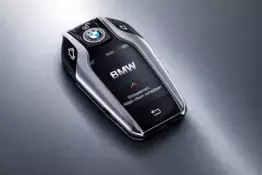
BMW bmw key fob battery replacement: a complete guide for the owner
As a BMW owner, you know that this vehicle symbolizes quality, innovation and comfort. One of the smallest but most important components in this ecosystem is your car key, or remote control. It is the link between the driver and the machine, allowing for keyless entry, engine starting and often saving personalized settings. But what happens when the remote control stops responding? In most cases, the answer is simple: it’s time to change the battery.
In this article, we'll delve into the world of BMW key fobs. We'll look at the different generations, explain which batteries to use, and provide step-by-step instructions on how to safely and quickly carry out the replacement process yourself, without having to visit a dealership right away.

signs that the bmw key battery needs replacing
Modern cars are equipped with smart enough software to proactively notify the driver. However, there are several symptoms that indicate a low battery:
- Dashboard message: On most F and G series models, the message "remote control battery empty" or "replace battery" appears on the display.
- Reduced operating radius: you need to be closer to the car than usual for the doors to unlock.
- Unstable operation: the remote control requires several attempts to press the buttons before the car responds.
- Comfort Access Failures: If your car has a keyless entry feature, it may be the first to fail because it requires constant two-way communication between the key and the car.
What kind of batteries does a BMW key fob battery use?
Before you start working on your key, it is critical to get the right replacement battery. BMW remotes almost exclusively use lithium coin cells. The most common types are:
| key type | model series examples | battery type |
|---|---|---|
| smart key | f-series (f10, f30, f15, etc.) | cr2032 |
| latest generation remote control | g-series (g30, g20, g05, etc.) | cr2032 |
| older diamond-shaped key | e46, e39, e53 (early) | vl2020 (rechargeable battery) |
| e-series insertable remote control | e60, e90, e70 | cr2032 (or soldered battery) |
| display key | g-series luxury models | integrated battery (usb charging) |

Important note: Always use quality brand products (e.g. Panasonic, Duracell, Energizer). Cheap batteries from unknown manufacturers may discharge unexpectedly quickly or leak, damaging the remote's sensitive electronics.
Step-by-step guide: F and G series keys (CR2032)
This is the most common type of BMW key today. It usually has four buttons and a silver or black edge.
1. remove the physical backup key
There is a small button on the side or back of the key. Press it and pull the metal key blade out of the housing. This blade is designed to open the doors in case the electronics completely fail.
2. open the back cover
For the G series, after removing the blade, you will see a hole where the tip of the blade fits to lift the back cover. For the F series, you will need to push in slightly while the blade is in the slot and pry the plastic cover up. Be careful not to scratch the plastic.
3. change the battery
The old battery is now visible. Remove it (use a small screwdriver if necessary) and insert a new CR2032. Make sure the positive (+) side is facing up .
4. assemble the key
Push the back cover back into place with a click and insert the metal spare key into the slot.
e-series "non-comfort access" keys: a big challenge
For older E-series models (e.g. E60, E90), the situation is more complicated. If your car does not have the Comfort Access function, the key will charge itself while it is in the ignition switch. This key has a VL2020 battery that is soldered to the circuit board.
If such a key no longer works, you have two options:
- Have a professional resolder the battery: this requires cutting open the case (since it was glued together at the factory) and soldering in a new battery.
- ordering a new key: this is more expensive, but ensures reliability.
However, if your E-series remote control has a rear-opening door, you have comfort access and it uses a standard CR2032 battery, which is replaced similarly to newer models.
bmw display key charging and maintenance
The display key is essentially a small smartphone in your pocket. It has a touchscreen and displays fuel level, window status, etc. This key does not open in the usual way to change the battery.
The key can be loaded in two ways:
- Micro-USB cable: There is a slot on the side of the key for charging.
- Wireless charging: Place the key in the wireless charging pocket in the car.
If the display key battery is completely empty, the physical buttons (lock/unlock) will still work for a while thanks to the reserve energy.
common mistakes and how to avoid them
Changing the battery seems easy, but there are a few places where you can go wrong:
- Wrong polarity: if you put the battery in upside down, the remote control will not work. Always check the "+" sign.
- Static electricity: Before touching the circuit board, touch a metal object to ground yourself.
- Excessive force: the plastic clips are fragile. If the cover does not come off, check that you have pressed all the buttons correctly.
- dirt between the sockets: if the key is already open, it's a good idea to clean the contacts with compressed air or isopropyl alcohol.
Does the remote need programming after replacement?
This is a question that scares many. The good news is that F and G series models (from around 2010+) generally do not require reprogramming after a battery change. The car will automatically recognize the key.
In older E-series models, it can sometimes happen that the remote loses synchronization if the battery has been dead for too long. In this case, the key must be "taught":
- Get into the car and close the doors.
- Put the key in the ignition for a moment and then take it out.
- Hold down the "unlock" button and at the same time press the "lock" button with the BMW logo three times.
- Release the buttons. The car will lock and unlock the doors briefly, confirming the synchronization.
Where can I buy new batteries and spare parts?
Don't leave your battery shopping to the last minute. It's a good idea to always keep one CR2032 battery at home or in the glove compartment of your car (carefully packed). In addition to batteries, the following are also available:
- Protective cases: leather or silicone covers that protect the remote from drops and wear.
- New cases: If your key buttons are worn out or the case is broken, the contents can be transferred to a new case.
summary
Replacing the battery in your BMW key is a simple maintenance job that anyone can do. It saves time and prevents you from being locked out of your vehicle at the most inopportune moment. Remember: use quality batteries, be gentle with plastic parts, and if a warning appears on the screen, act immediately.
Your BMW is built to be enjoyed – don't let a small battery get in the way of that enjoyment!
Do you have questions about a specific model or need help finding the right accessory? In our product range you will find a wide range of accessories that will help keep your driving experience worry-free.
 The data shown here, especially the complete database of car spare parts, may not be copied. It is strictly prohibited to duplicate the data and database and distribute the same, and/or instruct third parties to engage in such activities, without prior consent from TecAlliance. Any use of content in a manner not expressly authorized constitutes copyright infringement and violators will be prosecuted.